
- On a device connected to your hotspot, open a web browser and enter http://192.168.1.1, http://192.168.5.1, or http://attwifimanager in the address field to go to the Wi-Fi Manager.
- Enter the login. (The default login is "attadmin" or "kpadmin

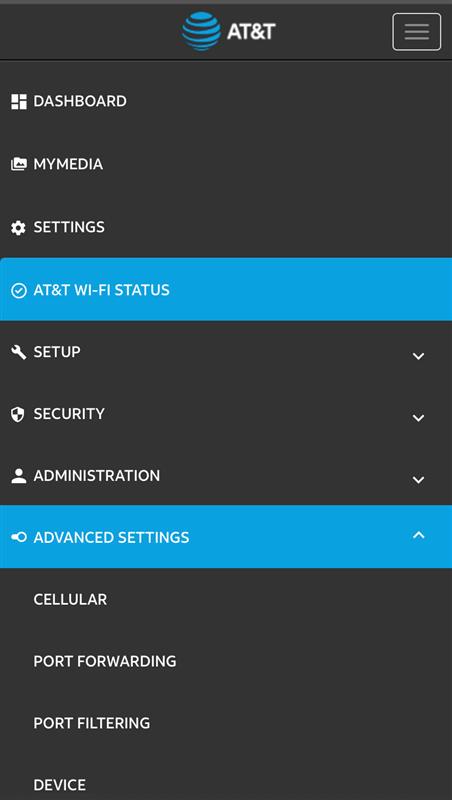
- Once logged in you will the home screen. Tap the triple dash icon in the upper right corner.


- Go to advanced settings
- Go to cellular
- Click "add" APN *Band Region- This should be set to "LTE All"
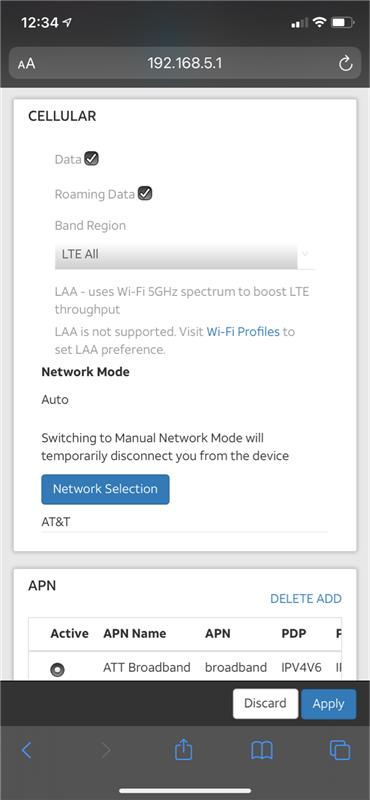
- Enter the information below in the fields as follows:
Profile Name: "Verizon" or "AT&T" depending on your carrier
APN: "Vzwinternet" or "Broadband"
PDP: IPV4/IPV6
PDP Roaming: IPV4
Authentication: None
Username: Leave Blank
Password: Leave Blank
save/ apply the settings
Make sure that you select the new updated APN as "Active"
Power your device off for a full 60 seconds then power back on and test your connection.
Comments
0 comments
Article is closed for comments.